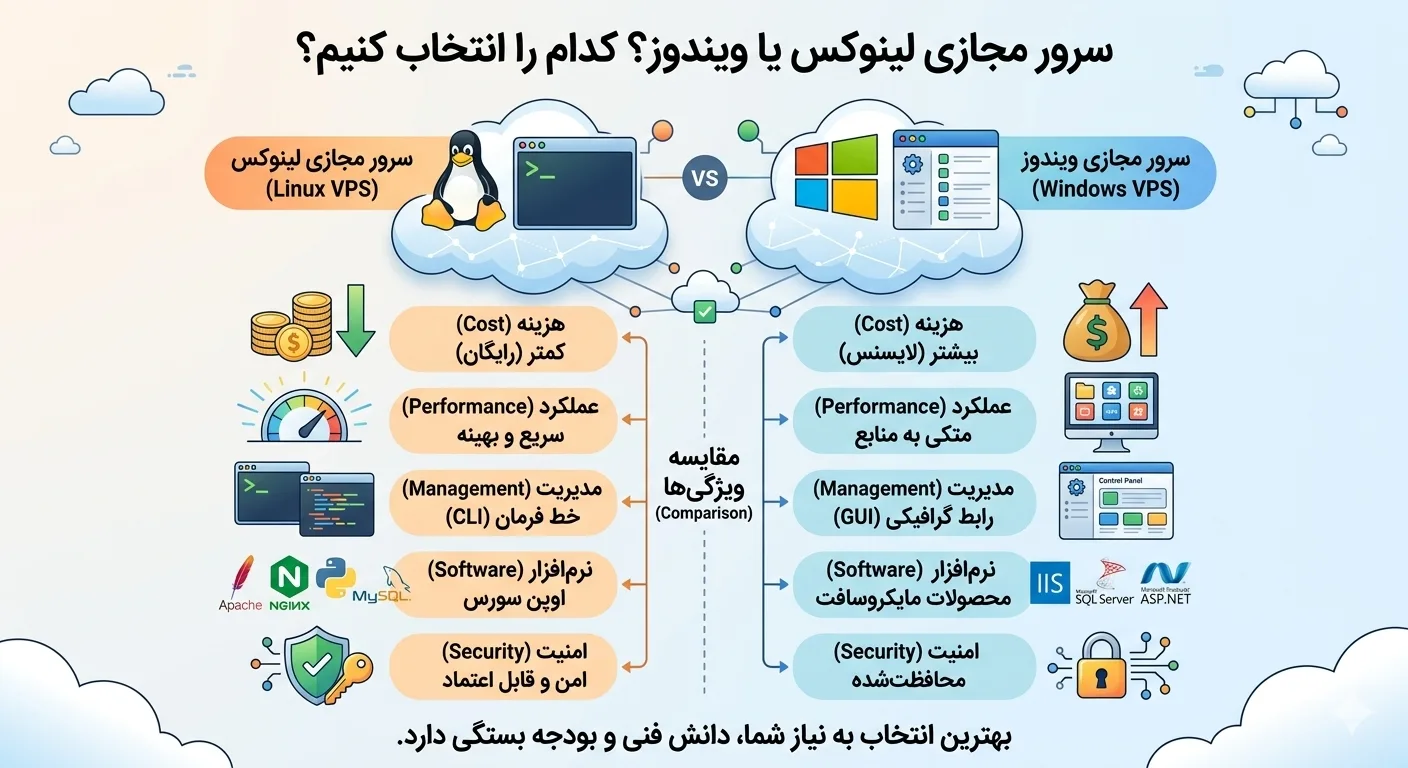
One of the first and most important decisions you have to make when purchasing a virtual server is choosing an operating system. The question Linux or Windows virtual server is challenging for many users, especially newcomers, because each of these two operating systems has its own strengths and weaknesses and is designed for different applications. The wrong choice can affect both your cost and the performance and compatibility of your project. In this comprehensive article, we completely and impartially compare Linux and Windows virtual servers from various aspects such as cost, performance, security, software compatibility and applications, so that you can choose the best option for your needs with complete knowledge.
Linux or Windows virtual server: definition and fundamental difference
Before a detailed comparison, it is necessary to understand what we are actually talking about when we ask Linux or Windows virtual server. The main difference between these two is in their architecture, design philosophy and software ecosystem.
Linux virtual server
Linux is an open source operating system that is available in various distributions such as Ubuntu, CentOS, Debian and Almalinux. Linux is the most popular server operating system around the world due to its lightweight, stability, high security and free. Its management is usually done through the command line (Terminal), although there are also graphical control panels.
Windows virtual server
Windows Server is a product of Microsoft and has a familiar graphical user interface that makes working with it simple for users who are comfortable with the Windows environment. Windows Server is essential for running proprietary Microsoft software and technologies such as ASP.NET, MSSQL, and Remote Desktop, but is more expensive due to licensing requirements.
Cost comparison: which is more affordable?
One of the most important criteria in choosing a Linux or Windows virtual server is cost. Because Linux is open source and free, there is no license fee, and for this reason, Linux virtual servers are usually cheaper than Windows examples.
On the other hand, Windows Server requires a valid license from Microsoft, which is added to the final price of the server. Additionally, Windows typically requires more hardware resources (especially RAM) due to its graphical interface and background services, which can increase the overall cost. Therefore, if you have a limited budget and your project does not require Windows, Linux is a more economical option.
Financial Tip: If you're just looking to host a website or run general projects, choosing Linux can save you a lot of money.
Of course, it should be noted that the cost of a Windows license may be fully justified against the value it provides for certain projects. If your business is dependent on Microsoft software or technologies, it would be pointless to save license fees by choosing Linux, because you won't be able to run your project on it at all. Therefore, the cost should not be considered alone, but alongside the real needs of the project.
Linux and Windows virtual server comparison table
To better understand the differences, the following table compares the most important criteria at a glance:
| Criterion | Linux virtual server | Windows virtual server |
|---|---|---|
| License fee | free | Need a license |
| User interface | Command line (and optional graphics) | graphical (GUI) |
| Resource consumption | style | heavier |
| security | very high | up |
| sustainability | very high | up |
| NET compatibility. | Limited (with .NET Core) | complete |
| Common database | MySQL, PostgreSQL | MSSQL |
| suitable for | Web, programming, server | Windows software, remote desktop |
Comparison of performance and stability
In the discussion of Linux or Windows virtual server in terms of performance, Linux consumes less resources due to its light architecture and no heavy graphical interface, and as a result, provides better performance with the same amount of hardware. Linux servers are known for their high stability and can run for months or even years without rebooting.
Windows Server also performs well, but consumes more resources due to the graphical interface and background services. Also, some Windows updates require a server restart, which can cause short-term outages. However, for projects built on Microsoft technologies, Windows provides the best performance and compatibility.
Security comparison
Security is one of the most critical aspects in choosing a Linux or Windows virtual server. Linux has traditionally been considered more secure due to its open source nature, large developer community, and strict licensing structure. Linux vulnerabilities are usually detected and fixed quickly, and less malware targets it.
Windows Server also has very good security in recent versions, but due to its wide popularity in enterprise environments, it is mostly targeted for attacks. Regardless of the choice of operating system, the real security of the server depends above all on the correct configuration, regular updates and compliance with security principles by the server administrator. A properly configured Windows server can be much more secure than an abandoned Linux server.
Applications: When Linux and when Windows?
The final answer to the Linux or Windows virtual server question depends on the type of project and your technical needs. In the following, we will examine the common scenarios of each.
When is a Linux virtual server suitable?
- Hosting WordPress, Joomla and other content management systems.
- Running programming projects with PHP, Python, Node.js and Ruby.
- Setting up Apache and Nginx web servers.
- Hosting MySQL and PostgreSQL databases.
- Setting up VPN services, proxies and Docker containers.
- Projects with limited budgets that require the greatest return on resources.
When is a Windows virtual server appropriate?
- Running applications based on ASP.NET and NET Framework.
- Using Microsoft SQL Server database.
- Requires remote desktop access (RDP) with a Windows graphical environment.
- Implementation of accounting and commercial software for Windows.
- Projects that depend on proprietary Microsoft technologies.
- Users who are more comfortable with the Windows graphical environment and do not have command line knowledge.
To view various Linux and Windows virtual server plans and choose the right option, you can refer to buy virtual server page.
Ease of management and learning curve
One of the important factors in choosing a Linux or Windows virtual server is ease of management. Windows Server is easier for users who have experience with Windows because of its familiar graphical interface. You can do many things with mouse clicks and graphical menus.
Linux may seem more difficult at first because it is often managed through the command line. But by learning a few basic commands or using graphical control panels such as cpanel, directadmin or webmin, managing Linux becomes much easier. If you are a beginner and just want to host your site, choosing a Linux server with a graphical control panel can provide the best combination of simplicity and economy.
Recommendation: If you are undecided between Linux and Windows and your project does not depend on specific Microsoft technology, choose Linux; It's both cheaper and more than adequate for most web applications.
Popular Linux distributions for virtual servers
When you decide on a Linux or Windows virtual server and choose Linux, you still have one more choice: which Linux distribution? Each distribution has its own features and user community. Knowing the most popular distributions will help you choose the best option.
- Ubuntu: The most popular Linux distribution with a very large user community, abundant documentation, and extensive support. It is a great option for beginners and most web projects.
- Debian: The most stable distribution, which is also considered the base of Ubuntu. Ideal for servers where long-term stability is a top priority.
- Almalinox and Rocky Linux: CentOS successors that are common for enterprise environments and servers with control panels such as cPanel.
- CentOS: was once the most popular enterprise distribution and is still used on many legacy servers.
Suggestion: If you are new to the world of Linux, choose Ubuntu; Its many educational resources and active community make it much easier for you to solve problems.
Important points after choosing the operating system
After you have answered the Linux or Windows virtual server question and finalized your choice, there are some important points that will help your server perform better and be more secure.
- Regular Updates: Whether you choose Linux or Windows, keeping your operating system and software up to date is critical to security.
- Access security: In Linux, use SSH key authentication, and in Windows, use strong passwords and restrict remote desktop access.
- Firewall configuration: Keep only essential ports open and close others to reduce the attack surface.
- Make regular backups: Periodic data backup is essential in both operating systems.
- Resource monitoring: Monitor RAM, CPU and disk usage to upgrade resources when needed.
Adhering to these principles will ensure that regardless of the operating system you choose, your server will remain stable, secure, and efficient, and you will be able to get the most out of your investment.
Software compatibility and ecosystem
One of the most important factors that play a role in deciding between a Linux or Windows virtual server is compatibility with the software and programming languages you use. Each operating system has its own ecosystem and the wrong choice can leave you with serious limitations.
Linux virtual server is well compatible with most open source technologies; Languages like PHP, Python, Node.js, Ruby, and Go, as well as MySQL, PostgreSQL, and MongoDB databases run natively on Linux and perform best. Most of the modern tools like Docker, Kubernetes and version management systems are also optimized in Linux environment.
In contrast, Windows Virtual Server is an unbeatable choice for Microsoft technologies. If your project is written in ASP.NET, uses a Microsoft SQL Server database, or depends on commercial Windows-specific software, you should definitely choose Windows Server. Therefore, before making a decision, make a detailed list of the software and technologies needed for your project and choose the right operating system based on that.
The important thing is that changing the operating system after the project is deployed can be difficult and expensive. If you deploy a project on Linux and later find out you need a Windows-specific software, you may have to do a full migration. For this reason, taking enough time to analyze the technical needs at the beginning of the work will prevent future hassles and costs and help you choose the right path from the beginning.
summary
In this article, we comprehensively answered the question of Linux or Windows virtual server. The bottom line is that none of these two operating systems is absolutely better than the other; Rather, the right choice depends on the type of your project. If you are looking to host a website, run open source programming projects, and save money, a Linux virtual server is the best choice. But if your project is based on Microsoft technologies such as ASP.NET and MSSQL, or you need Windows remote desktop, Windows virtual server is your essential option. By knowing exactly your technical needs and budget, you can make a decision that will give you the best results both in terms of performance and economics. To read more, you can refer to Rapido Server Articles.
Frequently asked questions
Linux virtual server is cheaper or Windows?
A Linux virtual server is usually cheaper because Linux is open source and free and has no licensing fees. In contrast, Windows Server requires a license from Microsoft and also requires more hardware resources, which increases the overall cost.
Can I run a WordPress site on a Windows server?
Yes, it is technically possible, but not recommended. WordPress is optimized for Linux environment and has better performance, lower cost and more compatibility on Linux server. For WordPress, Linux is always a better choice.
Which operating system is more secure?
Linux is traditionally considered more secure, but true server security depends more on proper configuration, regular updates, and compliance with security principles. Both operating systems can be very secure if managed properly.
If I am a beginner, should I choose Linux or Windows?
If you are more comfortable with the Windows graphical environment, Windows looks simpler. But to host the site, you can choose a Linux server with a graphical control panel such as cPanel, which is both cheap and easy to manage; This combination is ideal for most beginners.