Server backup is one of the most critical yet most overlooked aspects of infrastructure management. Many administrators only realize the value of backups when it is too late and they have lost their data. A hardware failure, ransomware attack, human error, or even a wrong command can destroy months of data in seconds. In this guide, we'll take a practical look at server backup best practices to make sure you can recover your virtual server and data in any situation. If you are looking for a stable infrastructure to host your important data, you can start by buying a virtual server.
Why is server backup necessary?
Data is the most valuable asset of any digital business. Unlike hardware, which can be replaced, lost data is often unrecoverable. Imagine a company's customer database, site content, or project files being completely destroyed; In many cases, this means the end of the business.
The threats that make server backups necessary are varied: disk and hardware failures, ransomware attacks that encrypt data, human error such as accidental deletion of files, security vulnerabilities that lead to intrusions, and even natural disasters that shut down a data center. A good backup strategy is your insurance against all these scenarios.
The difference between backup and redundancy
A common mistake is to confuse RAID or redundancy with backup. RAID protects against a single disk failure, but if you delete a file by mistake or ransomware encrypts the data, those changes are immediately applied to all disks. Redundancy is for availability, not disaster recovery. Backup means having a separate and independent copy taken from a fixed point in time.
The cost of data loss
Before you think the cost of setting up a proper backup system is high, consider the cost of data loss. For an online store, the loss of the order database can mean the loss of the trust of hundreds of customers and weeks of sales. For a software company, the destruction of project code and data can waste months of work. Many studies have shown that a significant percentage of businesses that experience a serious data loss go out of business shortly after the incident. In this way, investing in backup is not an expense, but a necessary insurance.
The golden rule of 3-2-1 in server backup
The most reliable principle in the backup world is the 3-2-1 rule, which has been known as the gold standard for years. This law says:
- 3 copies of data: original plus two backups.
- 2 different media: Save on two different types of media (e.g. local disk and cloud).
- 1 off-site copy: At least one copy in a geographical location separate from the main server.
The off-site version is critical; If all your backups are on the same server or data center, a single incident can wipe everything out. Keeping a copy in the cloud or another server in a different location eliminates this risk.
Types of server backup methods
Before choosing a tool, you should know the right type of backup. There are three main approaches, each with their own advantages and disadvantages.
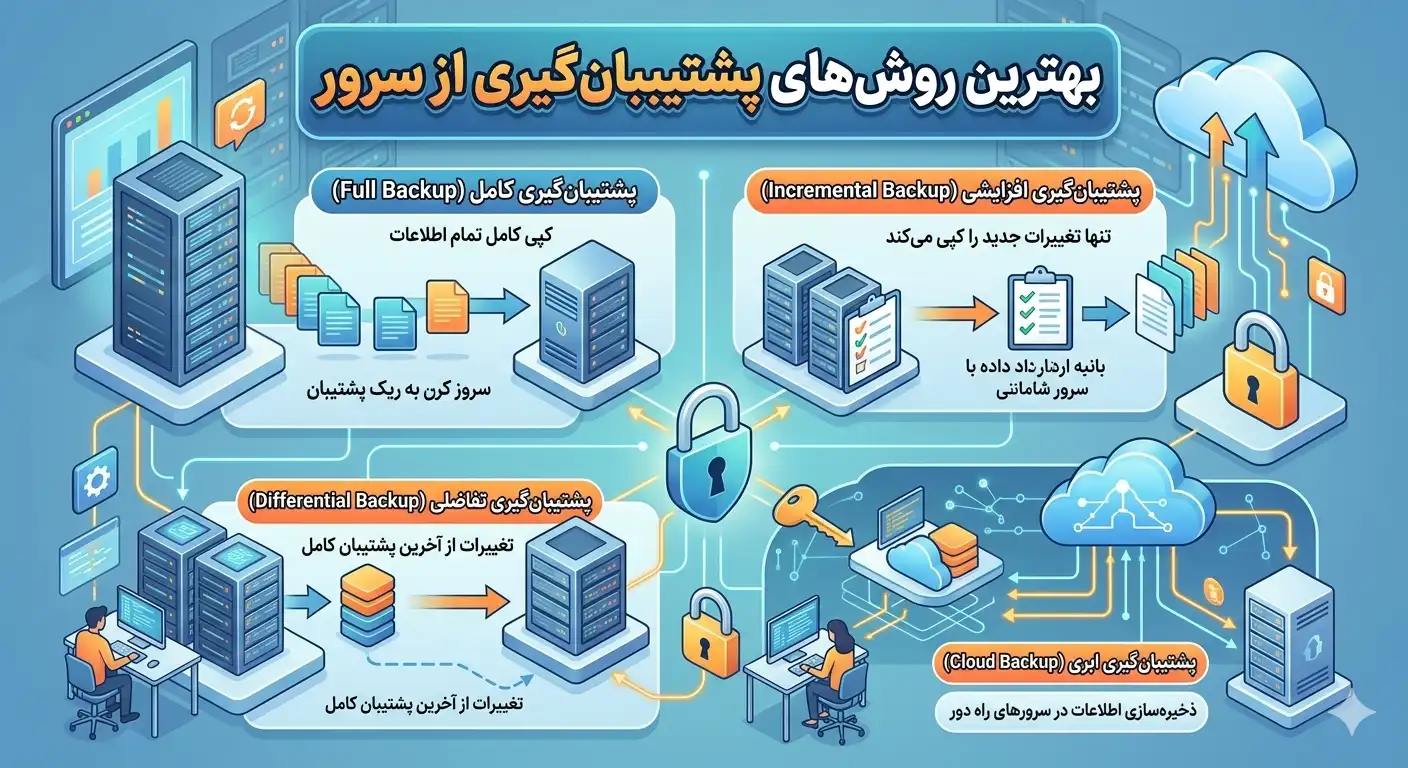
Full, incremental and differential backup
| type | explanation | space | Recovery speed |
|---|---|---|---|
| Full | Total data per load | a lot | quick |
| Incremental | Only changes since the last backup | low | slower |
| Differential | Changes since the last full backup | average | average |
A common and optimal strategy is a combination of these methods: a weekly full backup along with daily incremental backups. This combination saves both storage space and enables point-in-time recovery.
Practical backup tools and commands
Linux provides you with powerful backup tools. One of the most widely used is rsync, which is great for incrementally synchronizing files:
rsync -avz --delete /var/www/ /backup/www/
rsync -avz -e ssh /var/www/ user@backup-server:/backup/www/
The second command transfers the backup encrypted to a remote server via SSH, ideal for an off-site version.
Database backup
Backing up files alone is not enough; Databases should be backed up individually with their own tools to maintain data consistency. For MySQL and MariaDB:
mysqldump -u root -p --all-databases | gzip > /backup/db_$(date +%F).sql.gzAnd for PostgreSQL:
pg_dumpall -U postgres | gzip > /backup/pg_$(date +%F).sql.gzSecurity warning: Never put the database password directly in the script or command line, as it can be seen in the command history and process list. Use a secure configuration file like ~/.my.cnf with 600 permissions.
Automation with Cron
Manual backup is always forgotten; Automation is the key to success. Write a backup script and schedule it with cron. To edit cron:
crontab -eThen add a line to run the backup every night at 2 AM:
0 2 * * * /usr/local/bin/backup.sh >> /var/log/backup.log 2>&1Recording the output in the log file will help you quickly understand if the backup fails.
Backup encryption and security
Your backups contain your organization's most sensitive data, so they should be just as (or more) protected than the server itself. If an unencrypted backup falls into the hands of an attacker, virtually all of your data is exposed. You can use GPG to encrypt backups:
tar czf - /var/www | gpg -c > /backup/www_$(date +%F).tar.gz.gpgThis command creates a password-encrypted archive that cannot be opened without the password.
Retention cycle management
Keeping all backups endlessly consumes a lot of space. Establish a reasonable maintenance policy; For example, daily backups should be kept for seven days, weekly for one month, and monthly for one year. This can be done with scripts to automatically remove old files:
find /backup -name "*.gz" -mtime +7 -deleteA popular pattern for maintenance is the grandfather-father-son (GFS) method. In this method, daily backups (son) are kept for short term, weekly backups (father) for medium term and monthly backups (grandfather) for long term. This structure strikes a good balance between space consumption and the ability to return to different points in time.
Backup protection against ransomware
Modern ransomware specifically seeks to destroy backups in order to force the victim to pay the ransom. For this reason, online backups alone are not enough. The concept of "Immutable" backup comes up here; That is, a version that cannot be changed or deleted in any way (even by the administrator) until the end of the maintenance period. Many modern cloud services offer this capability. Also, keeping an air-gapped version is one of the safest ways to protect against ransomware.
Select the backup storage destination
The location of the backup copies is as important as the backup process itself. Each option has its own advantages and disadvantages, and the right choice depends on your needs and budget.
- Local storage (second disk): The fastest option for recovery, but does not protect against an entire server or data center failure.
- Dedicated Backup Server: A separate server used only to hold backups and connected to the main server via a secure network.
- Object Storage: S3-compatible services that are scalable, durable and cost-effective, ideal for off-site version.
- Cold Storage: For long-term archiving at a very low cost, but with a slower retrieval speed.
A balanced strategy is usually a combination of these options: keeping a local copy for fast day-to-day recovery while simultaneously sending an encrypted copy to the cloud to protect against major disasters. Modern tools such as restic and BorgBackup have simplified this task with built-in deduplication and encryption capabilities and are increasingly replacing manual scripts.
Deduplication and compression
One of the challenges of backup is the high volume of data and the cost of storage. Modern tools solve this problem with two techniques: compression, which reduces data size, and deduplication, which stores only unique blocks. That way, if a large portion of your data hasn't changed between successive backups, very little space is consumed, and you can keep a longer history of backups at a lower cost.
recovery test; The most important forgotten part
A backup that has never been tested is not really a backup. Many organizations back up for months, only to find in a moment of crisis that the files have been corrupted or the recovery process is not working. Regular recovery testing is the only way to ensure that backups are safe.
- Periodically (e.g. monthly) perform a test restore on a separate server.
- Verify the integrity of the retrieved data and the functionality of the services.
- Measure the time required for complete recovery (RTO) so that you are not caught off guard in a crisis.
- Document so that in an emergency, everyone on the team can follow the process.
Key point: Determine the two most important indicators for your business; RPO (the most data you can lose) and RTO (the most time you can stay offline). These two indicators determine how often and at what speed you should backup and restore.
Common errors in server backups
Even organizations that back up often make costly mistakes in times of crisis. Knowing these mistakes will help you avoid them:
- No recovery test: The most common and most dangerous mistake we discussed earlier.
- Keeping backups on the same server: In case of an accident, both the original and backup data will be lost.
- Forgetting to backup configurations: Just backing up data is not enough; Server configuration files, web server, and certificates should also be backed up to allow for a quick restore.
- Not encrypting sensitive backups: which, in case of theft, creates a security disaster.
- Lack of monitoring and notification: If a nightly backup fails and no one notices, you may go weeks without a healthy backup.
To solve the last case, be sure to set up a notification system that will send you an email or SMS if the backup succeeds or fails. Silence should not be taken as success; You should always have active verification that the process is healthy.
Summary of server backup strategy
A complete server backup strategy includes following the 3-2-1 rule, a combination of full and incremental backups, separate database backups, copy encryption, automation with cron, a reasonable maintenance policy, and most importantly, regular recovery testing. By following these principles, an unexpected incident can no longer destroy your business and you will always have a way back. Read other Rapido Server articles to read more about security and server management.
Frequently asked questions
How often should I backup?
This depends on how much your data changes. Daily backups are recommended for sites that are updated daily. For high-transaction stores, multiple times a day or even real-time database backups are required. The RPO indicator helps you determine the right distance.
Is RAID an alternative to backup?
No, not at all. RAID only protects against physical disk failure but no protection against accidental deletion, ransomware, software error or data corruption, as these changes are applied to all disks immediately. RAID and backup are two completely different and complementary concepts.
Where is the best place to store backups?
According to the 3-2-1 rule, the best approach is to simultaneously maintain one local copy for quick recovery and at least one off-site copy in the cloud or another data center. Keeping all backups on the same primary server is very dangerous because a single incident will wipe them all out.
Why should I test backups?
Because a damaged or incomplete backup is practically worthless in a crisis. Many organizations only discover that files are damaged or the recovery process is not working when they need a backup. Regular recovery testing is the only way to ensure that backups are usable.