If you're new to the world of web hosting and online infrastructure, you've probably wondered many times what virtual server is and why it's become so popular among developers, business owners, and technical managers. A virtual server or VPS (short for Virtual Private Server) is a separate and isolated part of a powerful physical server that provides you with dedicated resources such as CPU, RAM and storage space, just like having a full and independent server, but at a much lower cost. In this article, we explain in simple and practical language exactly how a virtual server works, how it differs from other hosting methods, and under what circumstances it is the best choice for you.
What is a virtual server and how does it work?
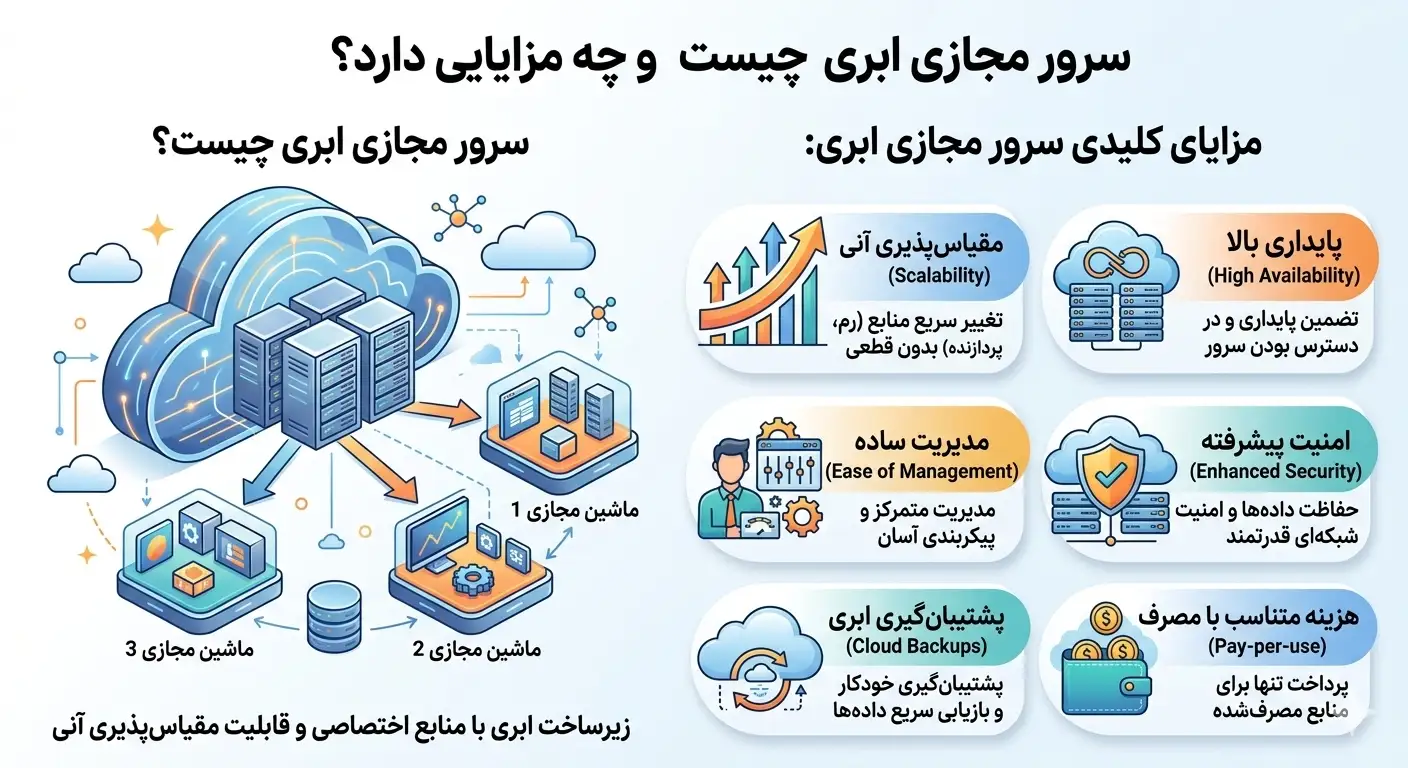
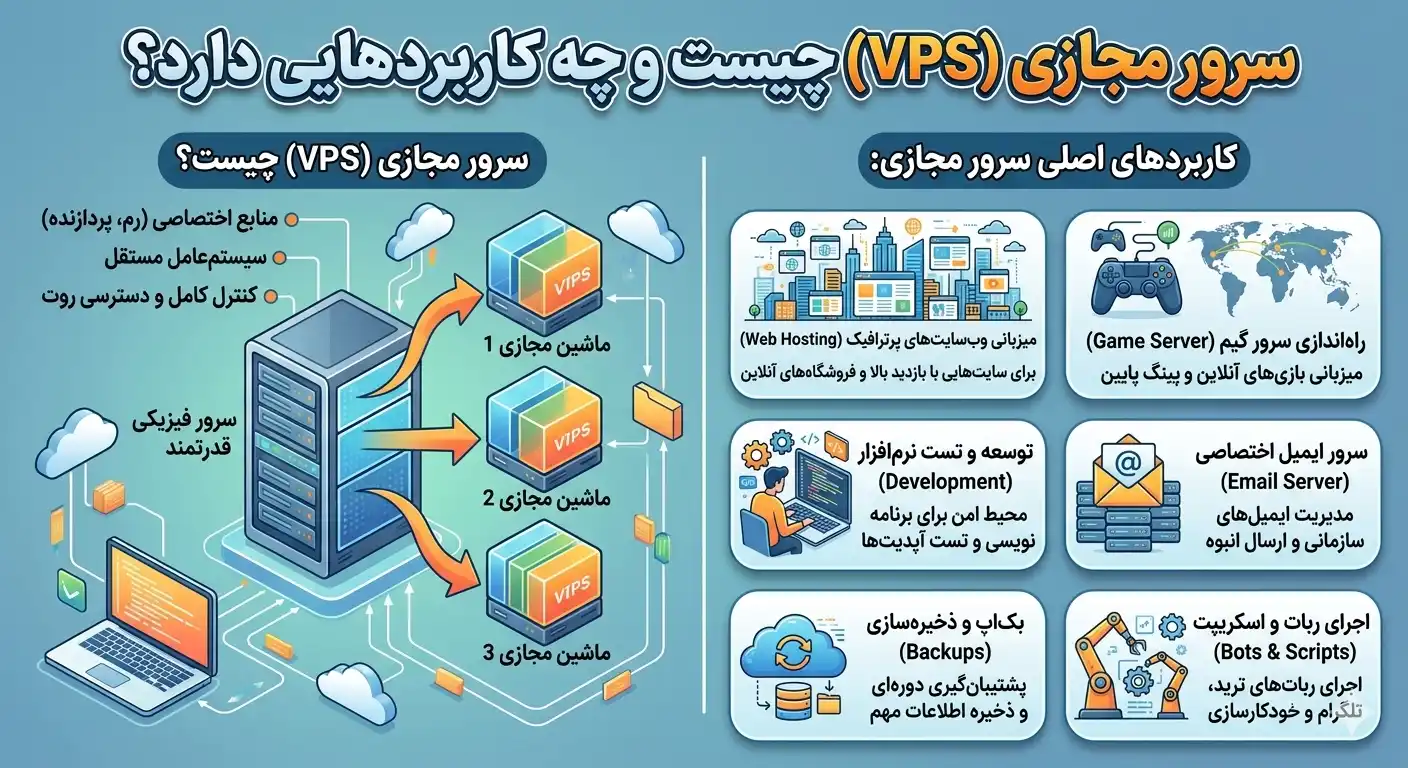
To better understand the concept of a virtual server, imagine you have a large apartment building. The whole building is the same physical server (Dedicated Server) which is located in the data center and has many hardware resources such as dozens of processing cores, hundreds of gigabytes of RAM and extensive storage space. Now this building is divided into several independent apartment units. Each unit has its own entrance, kitchen and facilities, and the residents of each unit live without disturbing others. Each of these apartments is equivalent to a virtual server.
This division is done through a software called "Hypervisor". A hypervisor is a layer that is installed on a physical server and divides hardware resources into isolated sections. Common virtualization technologies include KVM, VMware, Xen, and OpenVZ. Among these, KVM is considered the most popular option for professional virtual servers due to its complete isolation and true resource allocation.
The key is that in a real virtual server, the allocated resources are yours; This means that the RAM and processor you buy are only available to you and other users on the same physical server cannot use your share. This feature distinguishes a virtual server from a shared hosting where resources are shared among hundreds of users.
The main features of a virtual server
When we ask what is a virtual server, we must pay attention to the features that separate this service from other hosting options. The most important of these features are:
- Root access (Root/Administrator): You have full control over the operating system and can install or remove any software and change the settings as desired.
- Dedicated resources: CPU, RAM, and disk space specified and guaranteed belong to you.
- Complete Isolation: The activity of other users does not affect the performance of your server, and the security of your data is maintained.
- Dedicated IP: Each virtual server usually has one or more independent IP addresses that are important for SEO, email and some services.
- Scalability: If the needs grow, you can increase the server resources without migrating to a new server.
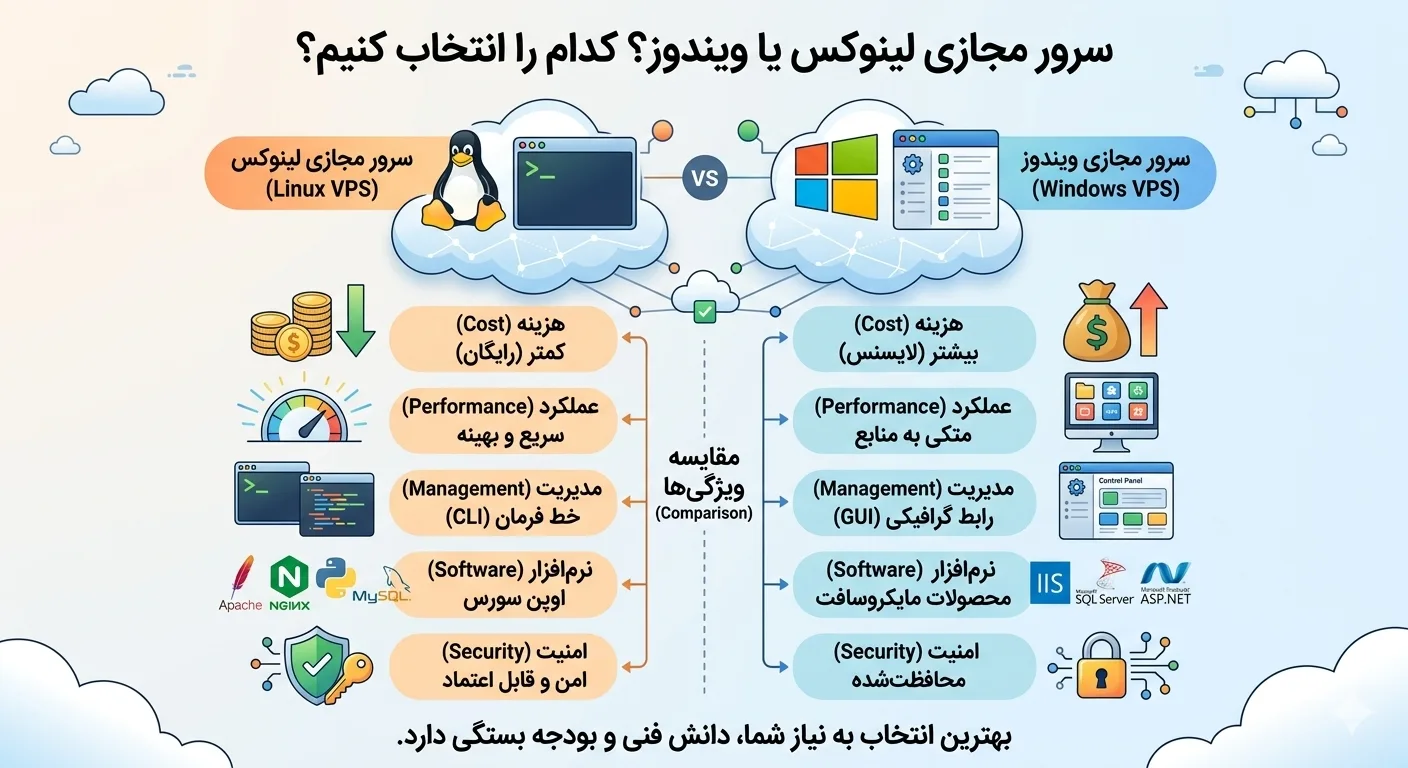
- Choice of operating system: Freedom to choose between different Linux distributions (Ubuntu, CentOS, Debian) or Windows server versions.
Tip: If you're looking for full control and guaranteed resources but have a limited budget, a virtual server is the ideal balance point between cheap shared hosting and expensive dedicated servers.
Types of virtual servers
Virtual servers can be classified from several perspectives. Knowing these categories will help you make a more accurate choice.
Based on operating system
Linux virtual server is popular with distributions like Ubuntu and CentOS for hosting websites, running applications and programming projects and has a lower cost. On the other hand, Windows virtual server is suitable for running Windows-based software, remote desktop and corporate applications.
Based on management
In an unmanaged server, you are responsible for installation, configuration, updates and security. This type is suitable for technical people. In the managed server, the provider's support team performs part of the technical work, which is easier for less experienced users.
Based on infrastructure technology
Traditional virtual servers are hosted on a specific physical server, while cloud virtual servers (Cloud VPS) run on a cluster of several servers and have higher stability. To learn more about this type, you can read our other articles in the Rapido Server Articles section.
Virtual server applications
Now that we are familiar with the concept of a virtual server, let's see how this service is useful in practice. The uses of VPS are very diverse and are becoming wider day by day:
- Hosting of popular websites: Online stores, news portals and sites that have high traffic and shared hosting is not responsible for them.
- Execution of applications and APIs: Backend deployment of mobile applications, web services and microservices.
- Development and Testing Environment: Developers use VPS to test code, set up staging environment and run CI/CD.
- Game Server: Hosting dedicated servers for games such as Minecraft and other online games.
- VPN and personal proxy: Set up a secure and dedicated service to connect to the Internet.
- Storage and backup: Keeping files and backing up important data in a safe space.
- Dedicated email hosting: Setting up an independent email server with full control over settings.
- Trading bots and automation: Continuous and non-stop execution of scripts and bots that need to be online 24 hours a day.
Comparison of virtual server with other hosting methods
One of the best ways to understand the position of a virtual server is to compare it with shared hosting and a dedicated server. The following table shows the key differences between these three options:
| Criterion | Shared hosting | virtual server (VPS) | Dedicated server |
|---|---|---|---|
| Resources | Shared among hundreds of users | Exclusive and guaranteed | Completely exclusive |
| Root access | does not have | has | has |
| cost | very low | average | up |
| Upgradable | limited | flexible | Requires new hardware |
| Security and isolation | down | up | very high |
| suitable for | Small sites | Medium to large sites and apps | Heavy organizational projects |
As you can see, the virtual server is the balance point between the two ends of the spectrum. Shared hosting is cheap but limited and dedicated server is powerful but expensive. VPS provides the most value for your money and is therefore the first choice of many businesses.
Advantages and disadvantages of virtual server
No technology is without its downsides. To make the right decision, you need to know both the advantages and limitations of a virtual server.
benefits
- Full control and freedom in system configuration.
- Stable performance and guaranteed resources.
- Reasonable cost compared to dedicated server.
- High security due to complete isolation.
- Ability to quickly upgrade resources with business growth.
- Support for all kinds of operating systems and software.
Disadvantages
- The need for technical knowledge to manage (unmanaged).
- Security and updates are the responsibility of the user.
- Higher cost than shared hosting.
- If configured incorrectly, performance issues may occur.
Recommendation: If you don't have enough technical experience but need the power of a VPS, choose a managed virtual server and let the support team do the bulk of the technical work for you.
How to choose a suitable virtual server?
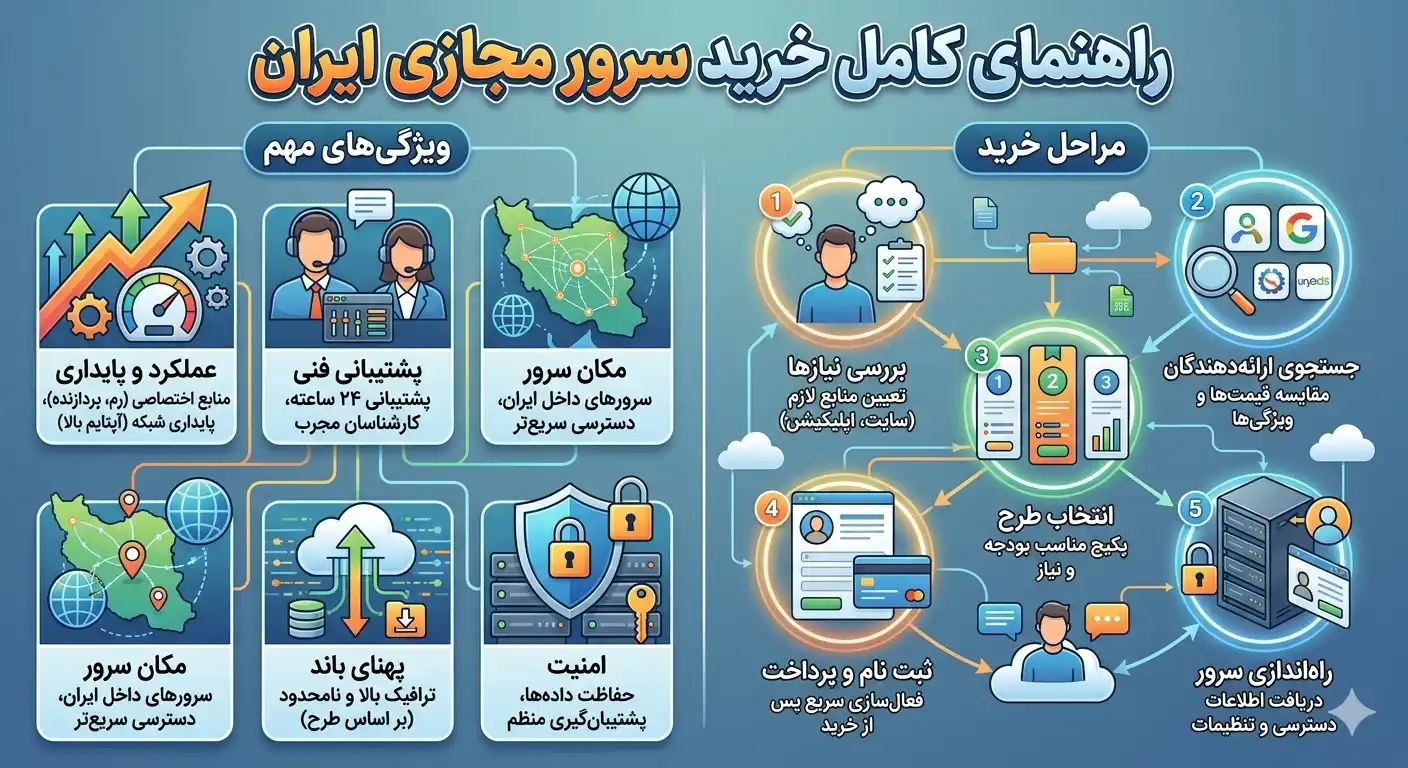
Choosing the right virtual server has a direct impact on the performance of your project. Pay attention to these factors when buying:
- Amount of resources: Based on the type of project, estimate the amount of RAM, number of processor cores and storage space required. For an average WordPress site, 2 GB of RAM and 2 cores are enough.
- Disk Type: NVMe and SSD disks are much faster than traditional hard drives and are essential for databases and dynamic sites.
- Location of data center: For Iranian users, virtual server with data center inside Iran provides low ping and high speed.
- Bandwidth and traffic: Pay attention to the amount of monthly traffic and bandwidth so that you do not face restrictions during high traffic days.
- Quality of support: Fast and round-the-clock support is critical in times of crisis.
- Uptime Guarantee: Reputable providers usually guarantee uptime of 99.9% or higher.
In Rapido Server, you can check various virtual server plans according to your budget and needs. Visit the Buy Virtual Server page to view the options and choose the plan that best fits your project.
Virtualization technologies in virtual server
As we mentioned in the answer to the question of what is a virtual server, the heart of every virtual server is virtualization technology. Familiarity with the types of these technologies will help you better evaluate the quality of the service you purchase. There are two main categories of virtualization that differ significantly in how resources are allocated.
Full Virtualization (KVM)
In the KVM method, each virtual server has its own independent operating system kernel, and allocated resources are reserved in a real and dedicated manner. This means that the RAM you have purchased is always available to you and it is possible to run different operating systems, including Windows. For this reason, KVM is considered the gold standard of professional virtual servers and is recommended for serious projects.
Operating system level virtualization (OpenVZ)
In the OpenVZ approach, all virtual servers share a common operating system kernel. This method is lighter and cheaper, but has poorer isolation and resources may be shared. For sensitive projects, KVM is a safer choice.
Purchase tip: When purchasing a virtual server, be sure to ask for the type of virtualization. If you need stable performance and guaranteed resources, go for KVM based servers.
Important technical criteria in virtual server performance
The performance of a virtual server does not depend only on the amount of RAM and processor; A few other technical criteria also play a decisive role, which many novice users overlook:
- Disk speed (IOPS): The number of input and output operations per second that directly affects the speed of reading and writing data and thus the speed of the database. NVMe disks perform much better than SSD and HDD in this measure.
- Network bandwidth: The speed of the server's network port, which is very important in transferring large amounts of data and serving users.
- Ping and network delay: The time interval between request and response that for internal users, servers with Iran data center give the best results.
- Ratio of resource allocation (Overselling): Some providers sell more resources than the actual capacity of the server, which causes a drop in performance. Reputable providers avoid this.
Paying attention to these criteria when comparing plans will help you to measure the real quality of the service beyond the apparent numbers of RAM and processor and make an informed choice.
summary
In this article, we thoroughly examined what a virtual server is and why it has become one of the most widely used infrastructures in the online world. Combining dedicated resources, full control, high security and reasonable cost, virtual server is an ideal option for a wide range of users; From developers and startups to online stores and large companies. If your project exceeds the capacity of shared hosting but you still don't need the power and cost of a dedicated server, a virtual server is exactly what you are looking for. By knowing your needs and choosing a reliable provider, you can enjoy all the benefits of this technology.
Frequently asked questions
Do I need to have technical knowledge to use a virtual server?
بستگی به نوع سرور دارد. For an unmanaged virtual server, you need basic knowledge of Linux command line or Windows server administration. But if you have no technical experience, you can choose a managed virtual server or a server with a graphical control panel such as cPanel to make it easier to manage.
What is the difference between virtual server and shared hosting?
In shared hosting, resources are shared among hundreds of users and you do not have root access, but in virtual server, you have exclusive and guaranteed resources and you have full control over the system. For this reason, VPS offers higher performance and security.
Can I increase my server resources later?
Yes, one of the most important advantages of a virtual server is the ability to easily upgrade resources. As your project grows, you can increase RAM, CPU, and storage space without having to migrate to a new server.
Is Linux or Windows virtual server better?
This choice depends on your needs. If you plan to host a website or run programming projects, Linux is cheaper and lighter. But if you need Windows-based software or remote desktop, Windows virtual server will be a more suitable option.